
Ranked #2 of 5 · Reviewed September 2026
TradeZella Review (2026): Deep Analytics at a Premium Price
A slick, widely marketed journal with deep analytics and backtesting - the default many traders reach for first.
Quick verdict
TradeZella is a genuinely strong, feature-rich journal - the issue is price. You get a lot, but you pay for the marketing budget too. If cost is no object it is a fine choice; if it is, cheaper tools now match most of the feature set.
What is TradeZella?
TradeZella is a cloud-based trading journal and performance-analytics platform built to pull the scattered parts of a trader's routine into one workspace. Rather than juggling a spreadsheet for logging, a charting tool for review, a separate app for backtesting, and a Discord channel for coaching, TradeZella aims to house all of it under a single login. Live trades, backtested sessions, documented strategies, replayed executions, and analytics reports share the same environment, and the platform's Zella AI layer now handles chunks of the post-session busywork automatically.
The platform connects to more than 500 brokers and trading platforms, including Interactive Brokers, MetaTrader 4 and 5, cTrader, TradeLocker, NinjaTrader, Tradovate, ThinkorSwim, Schwab, and Robinhood, with trades syncing automatically once an account is linked. If a broker is not on the list, trades can be brought in via CSV import. Coverage spans stocks, options, futures, forex, and crypto, which makes it a realistic fit for multi-asset traders who don't want to split their history across tools.
TradeZella has built a strong reputation in the space, carrying a 4.8/5 Trustpilot score from several hundred reviews, and it consistently earns praise for responsive customer support. It is one of the more polished and heavily marketed products in the category, and in our testing it lands as our #2 overall pick. The main reservations are straightforward: there is no free plan and no free trial, no dedicated mobile app, and pricing sits at the higher end of the market. For traders who will actually use the deep toolset, though, it is a genuinely capable platform, and the sections below walk through what stands out.
Key features
Customizable Analytics Dashboard
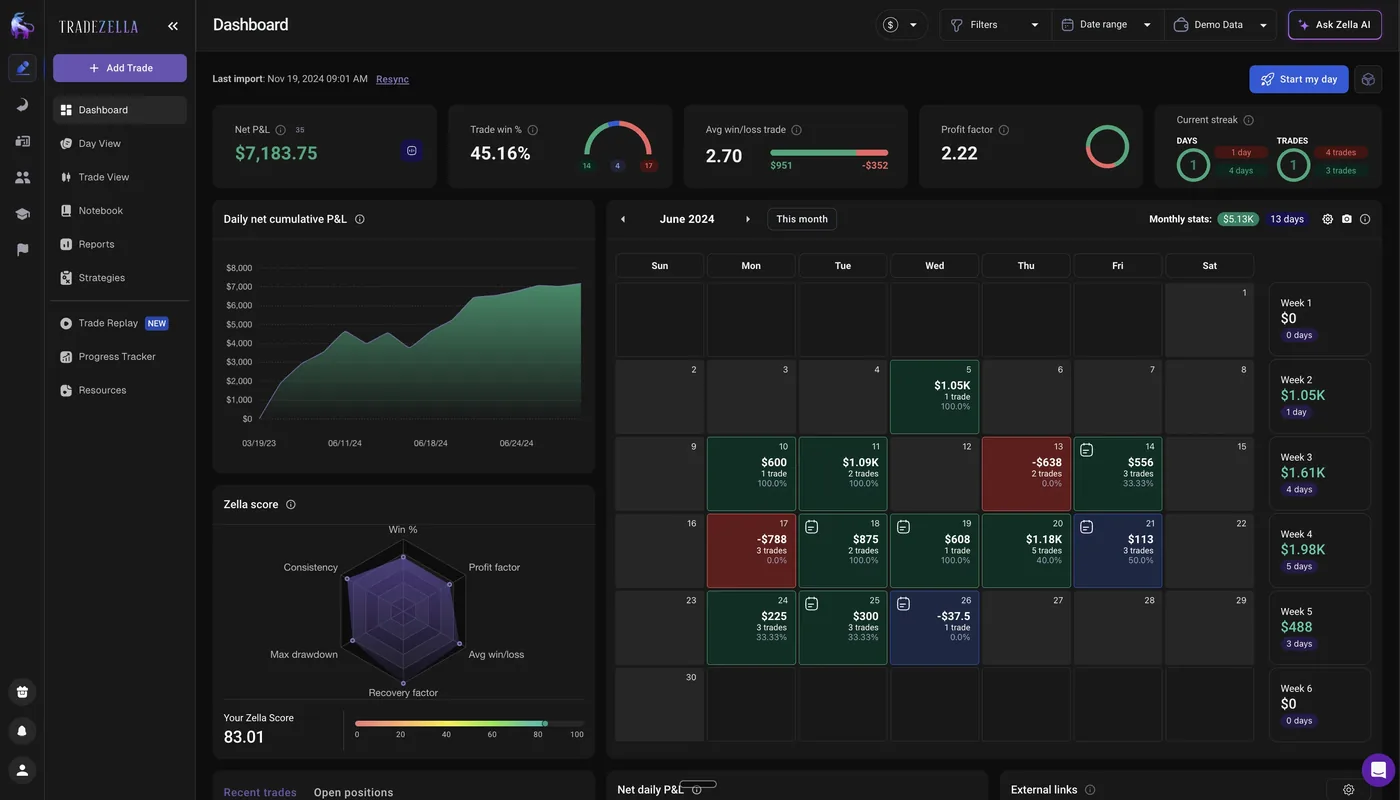
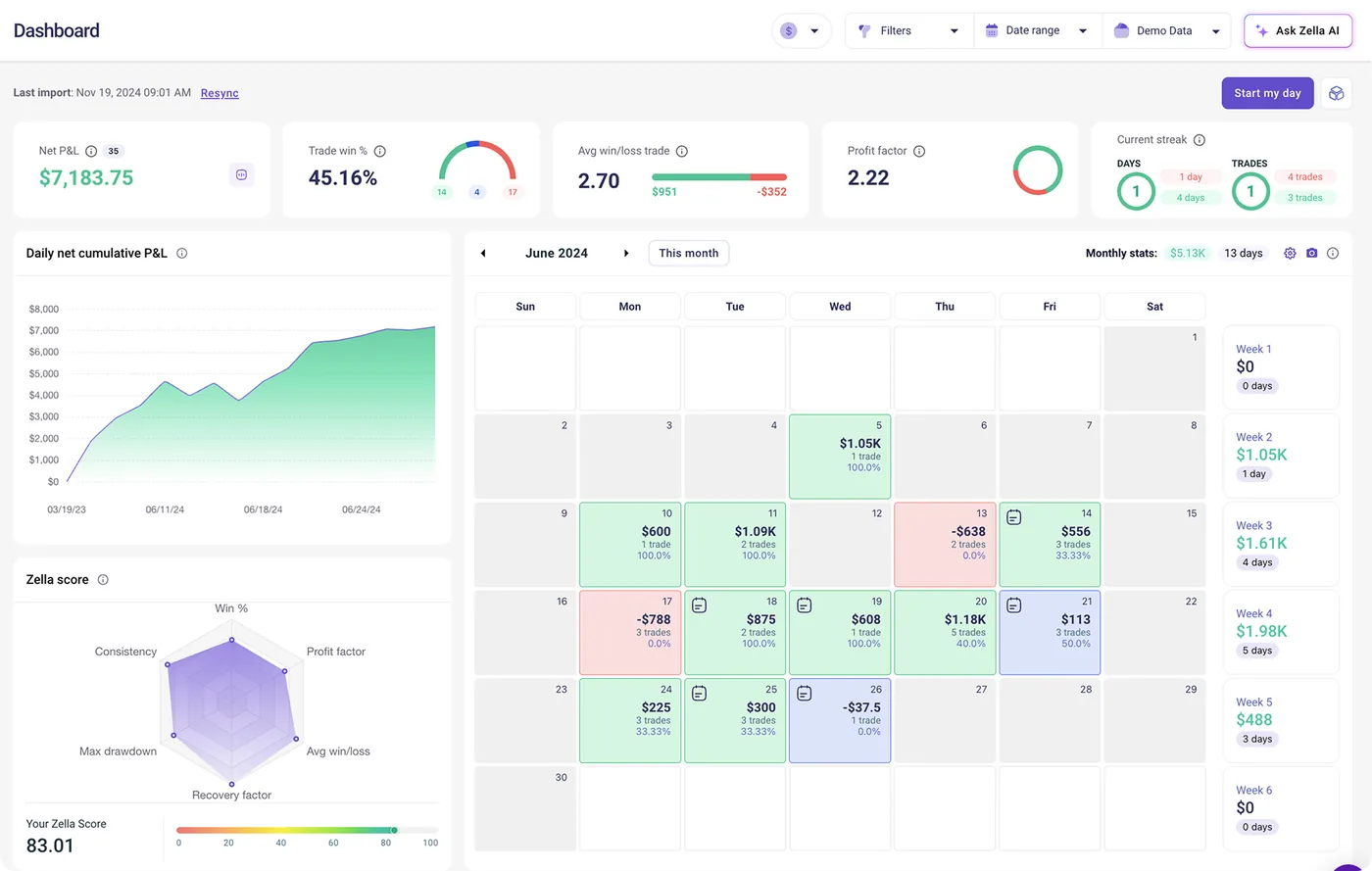
The home dashboard is modular. You decide which widgets appear, where they sit, and which metrics get top billing, so a scalper watching intraday execution can build a very different view from a swing trader tracking longer holds. Out of the box it surfaces the essentials: a calendar view of daily P&L, equity and profitability curves, price charts with your own executions plotted on them, and headline stats such as win rate, profit factor, and expectancy.
One touch we found genuinely useful is the running P&L visualization, which charts how a position's profit and loss moved while the trade was still open rather than only reporting the closed result. Seeing that you were up several hundred dollars before giving most of it back tells you far more about your exits and your emotional pressure points than a single flat number ever could. It is the kind of detail that turns a log into a diagnostic tool.
Trade Logging, Tagging, and the Notebook
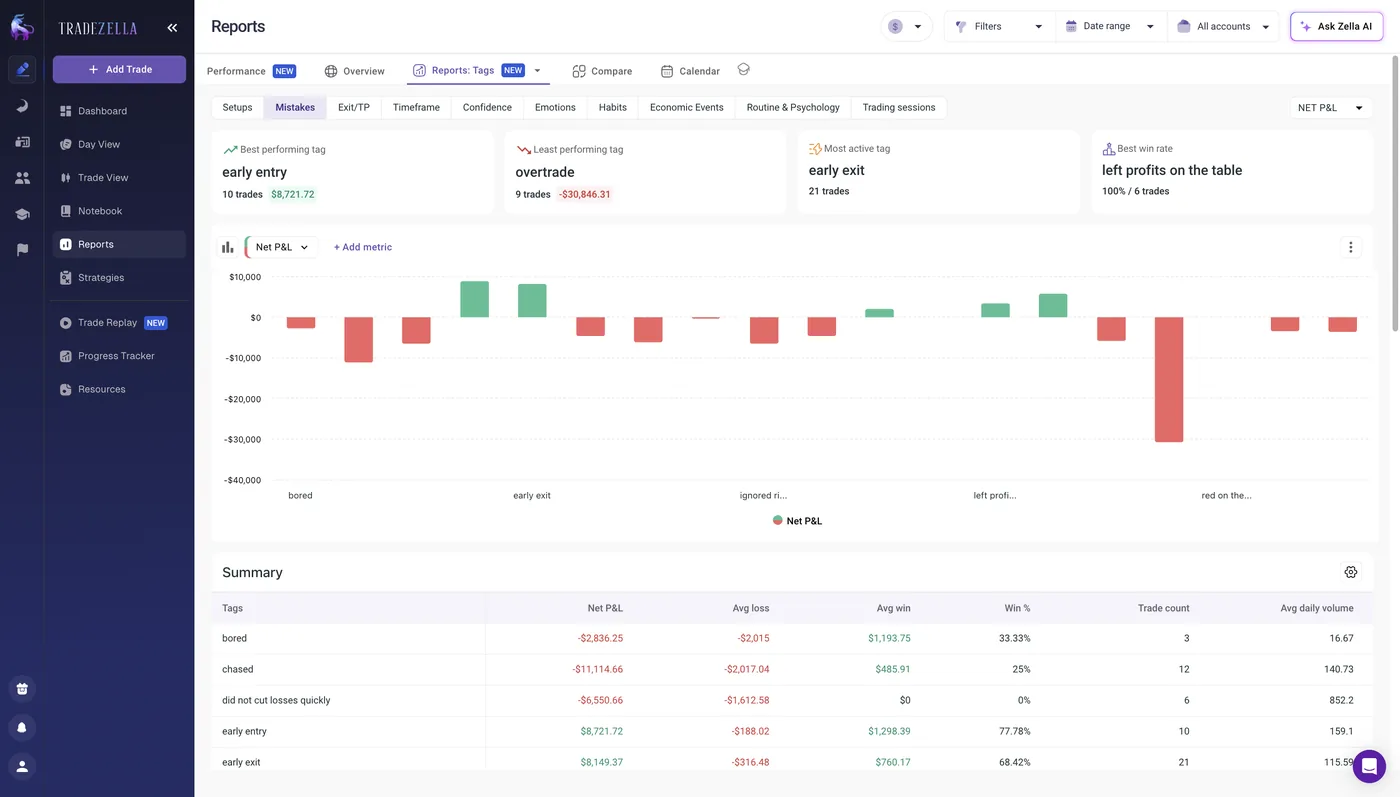
Every synced trade is logged automatically with the full record attached: entry and exit prices, size, P&L, timestamps, hold duration, and commissions. From there, the tagging system is where the journal earns its keep. You can label trades by setup, mistake, market condition, or any category you invent, and those tags feed straight into the reports. That means you can quickly see that your impulsive entries average a loss while your planned setups average a gain, which is exactly the sort of pattern most traders sense but never quantify.
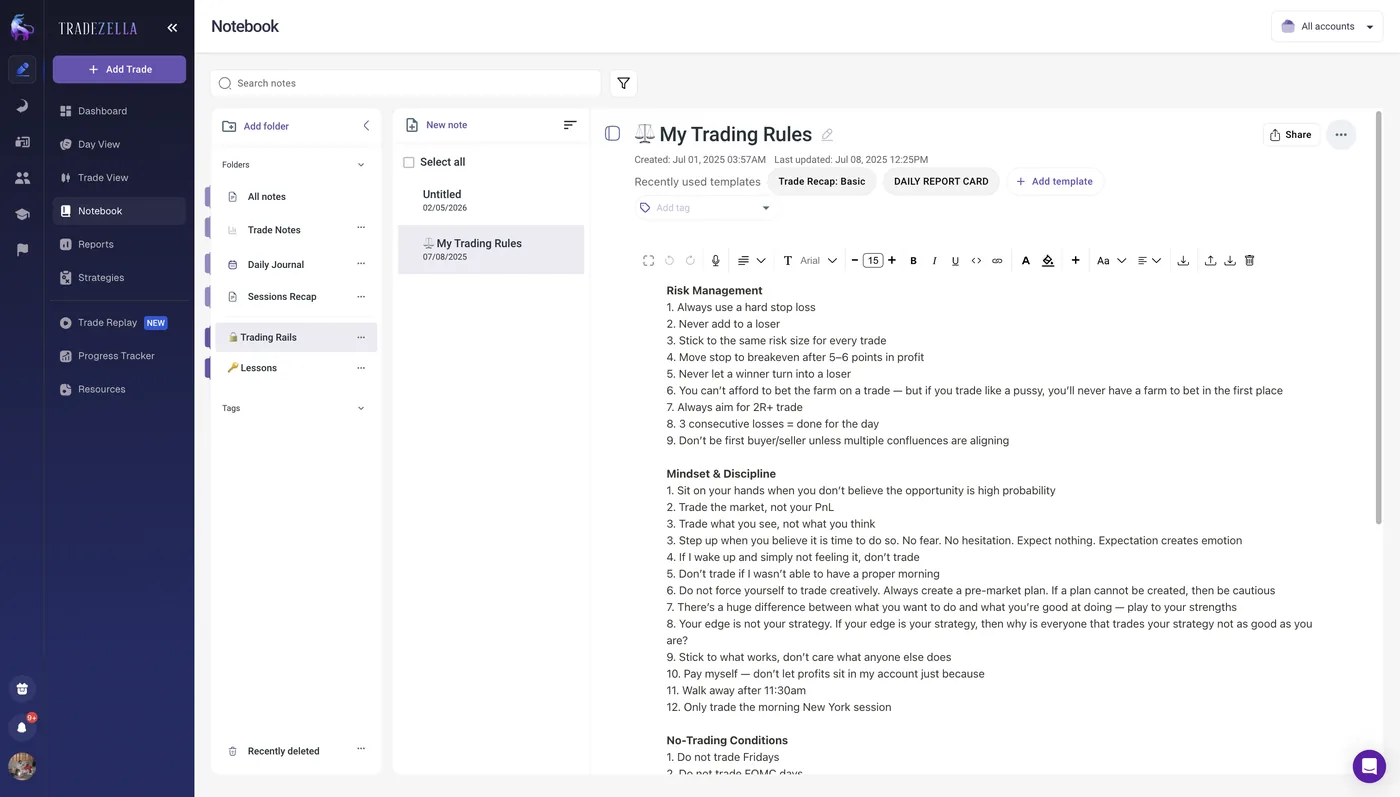
A global filter sits on top of everything, letting you slice the data by strategy, symbol, tag, day, time, risk, or outcome, with every report updating to match. The built-in Notebook rounds out the journaling side, offering templates for trading plans, watchlists, daily recaps, and pre-market notes, all tied back to your stats. TradeZella also handles the risk math for you: enter your take-profit and stop-loss levels and it calculates risk per trade, R-multiple, and reward-to-risk automatically.
Advanced Metrics: MFE/MAE, Zella Scale, and Best Exit Analysis
This cluster of metrics is where TradeZella pulls ahead of most journals, because it answers questions plain P&L tracking cannot. Maximum Favorable and Maximum Adverse Excursion (MFE/MAE) capture the best and worst points a trade reached while open. If your average favorable excursion dwarfs your average realized profit, the data is telling you that you exit too early; if your adverse excursion routinely runs past your stop, your trades are dipping deeper than your plan assumes.
The Zella Scale is a proprietary efficiency score that weighs your actual P&L against the potential P&L a trade offered, expressing how much of an available move you captured. Watching that percentage climb is a cleaner signal of skill development than raw profit, which swings with market conditions. Best Exit Analysis complements it by running your real trades through alternative exit strategies, estimating what an approach like trailing by one ATR would have done to your bottom line. Reproducing any of this by hand would mean hours in a spreadsheet.
300+ Drilled-Down Reports
TradeZella advertises more than 300 pre-built reports, and the breadth is one of its clearest advantages over rivals. Date and time reports break performance down by day of week, hour, session, and hold duration, so you can spot that you consistently give back gains on Fridays or that your sharpest trades land in the opening hour. Price and quantity reports show which symbols and position sizes suit you best.
There are also dedicated risk reports covering R-multiple and position-size impact, an options expiration report for options traders, and a wins-versus-losses view that lines up the traits of your best and worst trades side by side. Every custom tag category you create spins up its own report automatically, and a compare tool lets you pit any two sets of trades against each other, morning versus afternoon or last month versus this one. For traders who like to interrogate their data, there is a lot to dig into here.
Strategy Library and Ready-Made Templates
TradeZella's strategy system (recently renamed from playbooks) lets you document each approach you trade and attach full performance analytics to it. You define entry criteria, exit rules, risk parameters, and the market conditions you want, then tag trades to the relevant strategy and watch win rate, net P&L, average win and loss, and R-multiple accumulate. Over time it makes plain which strategies actually make money and which quietly bleed the account. Essential caps you at 10 strategies; Pro and Ultra are unlimited.
The standout is a library of 25+ ready-made strategy templates authored by professional traders, covering everything from ICT-based methods to volume profile, break-and-retest, and auction market theory across all supported asset classes. Each template arrives complete with an overview, rules, entry and exit criteria, and example trades, giving newer traders a structured starting framework and experienced traders proven setups to test and adapt. You can also log missed trades to see what your discipline is costing you, and share strategies with a trading group. It is a feature set few competitors attempt.

Backtesting With Historical Data and ICT Indicators
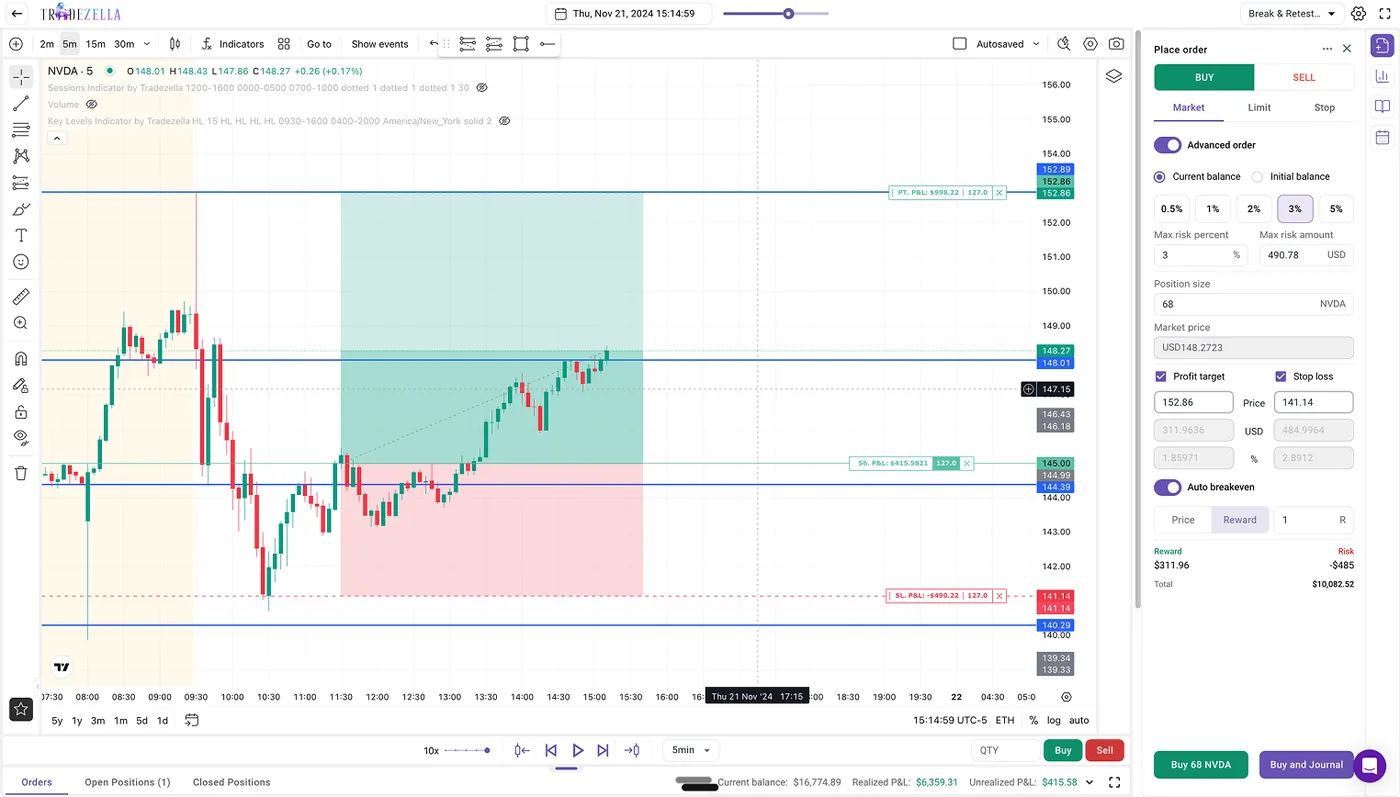
Backtesting is one of TradeZella's deepest tools, and unlimited manual backtesting sessions are included on every plan rather than gated behind a premium tier, something many platforms don't offer at all. (Automated AI backtesting is the exception: none on Essential, 10 a month on Pro, 100 on Ultra.) You can test against roughly 11 years of historical data reaching back to September 2014 across forex, futures, stocks, and crypto, which covers a wide span of bull runs, bear markets, the COVID crash, and multiple rate cycles. Execution feels realistic, with market, limit, and stop orders, automatic position sizing by risk percentage, auto-breakeven, and manual partials.
The charting is professional-grade: up to five symbols per session, up to eight charts at once, timeframes down to the second, and an economic calendar overlaid on the chart. TradeZella also builds in native ICT indicators, Fair Value Gap, Asian Session Range, HTF Bias, Key Levels, and Power of 3, with no third-party scripts required, which is a real draw for that growing community. A go-to control skips you forward to specific dates or sessions, speed runs from 0.5x up to 10x, and every backtested trade logs to your journal automatically so you can compare simulated results against live performance for the same strategy.
Trade Replay
Trade Replay is distinct from backtesting: instead of testing a hypothetical strategy on old data, it lets you rewatch trades you actually placed with real money, tick by tick, like reviewing game film. Trade Replay mode plays a single trade from pre-entry to final exit, while Day Replay mode replays an entire session, which is genuinely useful for seeing how an early loss bled into later decisions or whether your discipline frayed as the day wore on. A third Scenario Replay mode is listed as coming soon.
The controls are detailed: second-by-second playback, speeds up to 30x, entry and exit markers on the chart, multiple timeframes, Time of Sales data, and Level II depth. You can tag mistakes, add notes, and grab screenshots as you go, all of which syncs back to your reports. It is not included on the Essential plan; you need Pro or Ultra. Worth noting for scalpers is that some competitors offer finer replay precision, but TradeZella's session-level Day Replay is a distinctive angle on the review process.

Prop Firm Sync
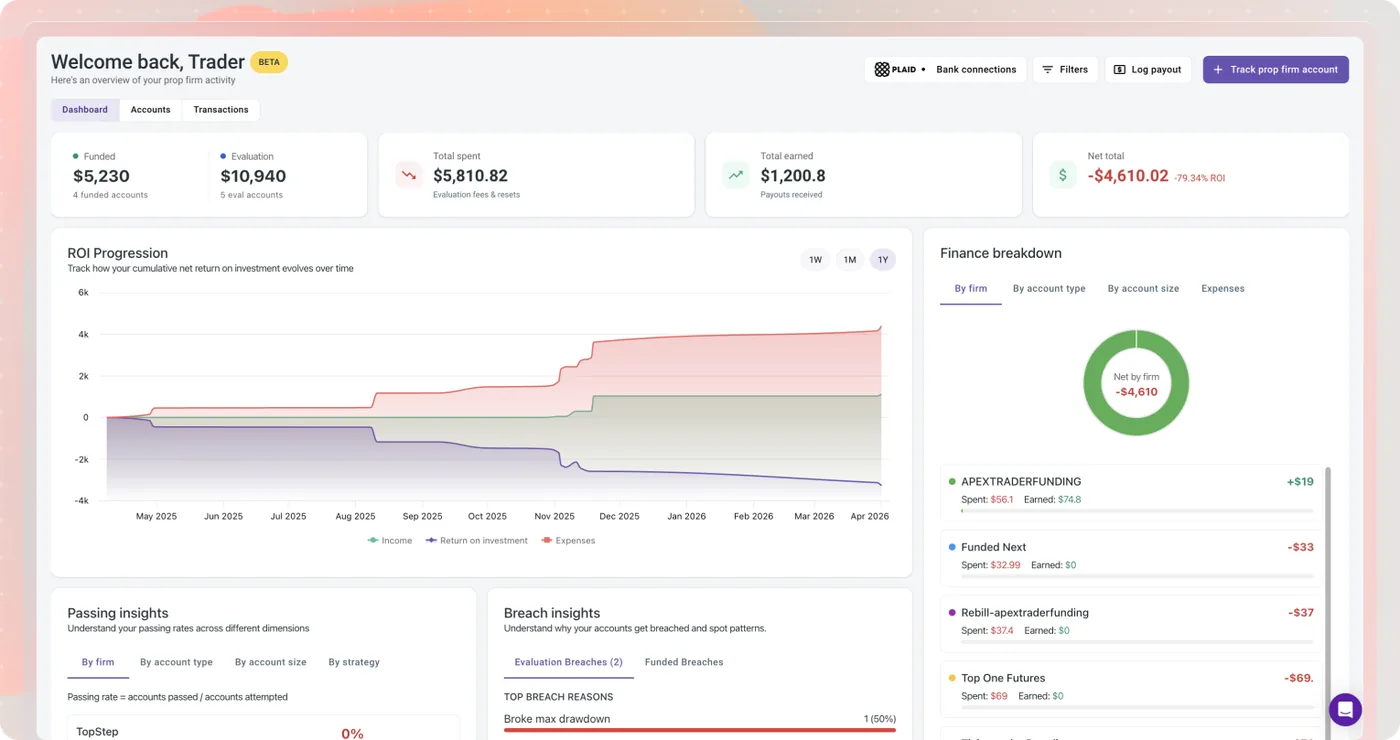
For the growing number of traders working through prop firm evaluations, TradeZella includes a dedicated Prop Firm Sync dashboard at no extra cost. It connects to your bank through Plaid to track prop firm expenses, evaluations, resets, and activation fees, alongside payouts, then calculates your net P&L and ROI across every firm in one place. Account monitoring keeps an eye on real-time progress toward profit targets, drawdown levels, daily loss limits, and consistency rules.
When an account fails, the tool digs into why, flagging rule violations, overtrading, or specific behavioral mistakes, and links the failure back to the actual trades in your journal so the lesson is concrete. A Challenge Simulator in beta even estimates your pass or fail probability before you buy an evaluation, based on your own trading history. It supports major firms including TopStep, Apex, and Tradeify, and it is a genuinely differentiated piece of the platform.
Zella AI: Autonomous Journaling Agents
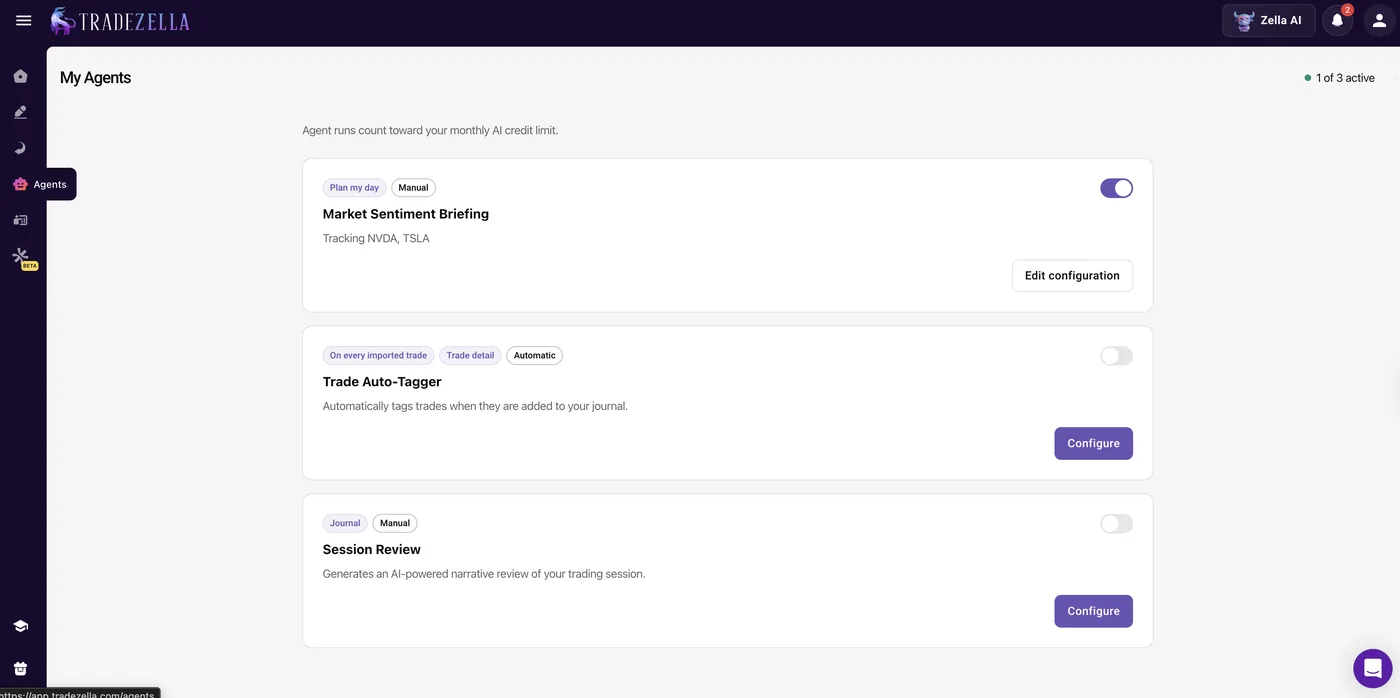
Zella AI is TradeZella's most ambitious recent addition, and it reframes the platform as something closer to an AI-assisted trading partner. Rather than requiring you to review and tag everything by hand, three background agents handle the work most traders abandon within a couple of months. The Market Sentiment Briefing generates a personalized pre-market plan each morning from your history and current focus, the Auto Trade Tagger categorizes every trade against rules you define, and the Session Review analyzes your whole day after the close, comparing it to your plan and flagging revenge trades or sizing slips.
There is also a conversational layer: you can ask Zella AI plain-language questions like what your win rate is on Monday mornings, and it answers from your real trade data rather than generic advice. Importantly, Zella AI does not place orders or manage positions, so you stay in control of every decision. Its job is to remove the manual maintenance that causes most journaling habits to collapse, and on that front it is a thoughtful use of automation rather than novelty for its own sake. The Zella Agents are included on Pro and Ultra only; Essential comes with 500 AI credits a month but not the agents themselves.
TradeZella pricing (2026)
TradeZella now sells three tiers - Essential, Pro and Ultra - and the practical takeaway has changed: the features people buy TradeZella for are no longer all on the entry plan. Essential covers automated journaling, 300+ reports and unlimited manual backtesting for one connected account, but Trade Replay and the Zella AI agents start at Pro. Annual billing takes 25% off every tier. There is still no free plan and no free trial, so evaluating the platform means paying for at least one month. Prices below were checked on tradezella.com in September 2026.
| Plan | Month-to-month | Annual (per month) | Billed yearly | Who it's for |
|---|---|---|---|---|
| Essential | $35 | $26/mo | $315 | One account, journaling and reports, no replay or AI agents |
| Pro | $59 | $44/mo | $531 | Most traders: unlocks Trade Replay and the Zella AI agents |
| Ultra | $99 | $74/mo | $891 | Coaches and heavy automated-backtesting users |
Does TradeZella have a free trial or free plan?
No. Neither the pricing page nor the homepage offers a free plan or a free trial, and that remains the most common complaint about the platform. The practical workaround is to buy one month of Essential at $35 (or Pro at $59 if you want to test replay and the AI agents), treat it as a paid trial, then switch to annual billing if it earns its place. If starting free matters, TradeOlogy has a free-forever tier and Tradervue a free plan capped at 30 trades a month.
Monthly vs annual: what you actually pay per year
Month-to-month, a year of TradeZella costs $420 on Essential, $708 on Pro and $1,188 on Ultra. Annual billing cuts those to $315, $531 and $891 - a saving of $105, $177 and $297 respectively. Because there is no trial, the sensible sequence is one monthly payment first, then the annual switch once you know which tier you need.
Which TradeZella plan do you actually need?
Essential is enough if you trade one account and want automated journaling, the reports and manual backtesting. The moment you want Trade Replay, the Zella AI agents or more than one connected account, you need Pro - which is why TradeZella marks it 'most popular'. Ultra only makes sense for coaches running many accounts or traders who burn through automated backtests.
TradeZella broker integrations
TradeZella advertises connections to 500+ brokers and prop firms, and in practice the list covers every mainstream US broker plus the platforms forex and futures traders actually use. Once an account is linked, trades flow in automatically. Note the account limits: Essential allows one connected trading account, Pro fifty and Ultra unlimited.
Supported brokers and platforms by market
Stocks and options traders will find thinkorswim and Schwab, Interactive Brokers and Robinhood on the list. Futures traders get NinjaTrader and Tradovate; forex traders get MetaTrader 4, MetaTrader 5, cTrader and TradeLocker. Crypto is covered too, so all five markets can live in one trade history.
Prop firm sync
Prop firm accounts are first-class citizens: TradeZella counts prop firms alongside brokers in its 500+ figure, and the Prop Firm Sync dashboard tracks evaluation fees, resets, payouts, drawdown limits and consistency rules across firms including TopStep, Apex and Tradeify. See our guide to the best trading journal for prop firm traders for how it compares on that job.
CSV import when your broker is not listed
If your broker is not among the 500+, trades can be brought in by CSV import. It is a manual step, but it means no broker rules TradeZella out entirely - and it is the route most traders use to bring in history from a previous journal.
TradeZella pros and cons
What we liked
- Deep analytics with 300+ prebuilt reports
- Backtesting and trade replay built in
- Wide broker support and a large user community
- Very polished onboarding and UI
Where it falls short
- Among the more expensive options, with no free plan and no free trial
- Trade Replay and the Zella AI agents need the Pro plan ($44/mo annual, $59 monthly)
- Feature depth can feel heavy for newer traders
Who TradeZella is for
A good fit if…
- Active day traders and scalpers who want deep analytics, session-level trade replay, and automated reviews to find patterns across high trade volume
- Multi-asset traders working across stocks, options, futures, forex, and crypto who want a single home for all of it
- Prop firm traders juggling several evaluations who need centralized tracking of expenses, payouts, drawdown limits, and consistency rules
- ICT traders who want native Fair Value Gap, HTF Bias, and Power of 3 indicators built into backtesting without third-party scripts
- Traders who have quit journaling before because the manual upkeep wore them down and want AI agents to handle tagging and session reviews
- Mentors and coaches who want structured, data-driven visibility into their students' accounts through Spaces
Look elsewhere if…
- Cost-conscious traders or beginners who want to start free and pay later, since there is no permanent free plan and no free trial
- Traders who journal primarily from their phone, as there is no dedicated mobile app (only a responsive web view)
- Anyone who only needs simple trade logging and won't use the backtesting, replay, and strategy tools that justify the price
- Options traders who rely on multi-leg strategies, which the platform does not currently support
- Traders who want a dedicated psychology or emotion-tracking module as a core feature
TradeZella alternatives and comparisons
TradeZella sits at our #2 spot, just behind our overall top pick, TradeOlogy, and the two are closely matched on core capability. Both auto-sync a wide range of brokers, cover stocks, options, futures, and crypto, and pair a clean modern interface with a deep analytics engine and a built-in trade simulator. Where TradeZella has the edge is maturity and momentum: it is a more established brand with a larger user base, heavier marketing presence, a longer track record of feature releases, and standout extras like its 25+ pro-authored strategy templates, native ICT indicators, and the Prop Firm Sync dashboard. If you want the most feature-dense platform in the category and the reassurance of a well-known name, TradeZella makes a strong case.
The trade-off comes down to price and access. TradeZella starts at $26/mo on annual billing ($35 month-to-month) with no free option, and Trade Replay plus the AI agents need the $44/mo Pro plan, whereas TradeOlogy offers a genuinely free-forever tier and a Pro plan from $15/mo, roughly half the cost for a comparable core toolkit that auto-syncs 25+ brokers, supports the same asset classes, and includes a simulator. Our honest read is that TradeZella suits traders who will use its full breadth of advanced and coaching tools and don't mind paying a premium, while TradeOlogy delivers most of the same day-to-day value at a lower price with a far easier on-ramp, which is why it edges out TradeZella for the top spot.
How TradeZella compares to our top pick
TradeZella is a capable journal, but on our overall scoring it sits behind TradeOlogy (9.4/10), which pairs 25+ broker auto-sync and a customizable analytics dashboard with a free-forever tier and paid plans from $15/mo.
Read the TradeOlogy review →Free Trading Journal Template
Track your trades, analyze performance, and improve your strategy. Enter your email to get the free spreadsheet.
No spam. Just the template link.
TradeZella - FAQ
Does TradeZella offer a free trial or free plan?
No. TradeZella has neither a free trial nor a permanent free plan, which is its most commonly cited drawback. The most practical way to evaluate it is to sign up for month-to-month Essential at $35 - or Pro at $59 if you want to test Trade Replay and the AI agents - and treat that first month as a trial, then switch to annual billing if it proves its worth. If starting free matters to you, our top pick TradeOlogy has a free-forever tier.
Is TradeZella worth the price?
For traders who actively use the backtesting, trade replay, strategy tools and analytics, the value holds up well, since buying those capabilities separately would easily run past $100 a month. Just price the right tier: Trade Replay and the Zella AI agents start at Pro ($44/mo annual, $59 monthly), not Essential. If you only need basic trade logging, it is more platform than you'll use and cheaper options exist.
Which TradeZella plan should I choose?
Essential ($35 monthly, $26/mo annual) if you trade one account and mainly want automated journaling, the 300+ reports and manual backtesting. Pro ($59 monthly, $44/mo annual) once you want Trade Replay, the Zella AI agents or more than one connected account. Ultra ($99 monthly, $74/mo annual) is for coaches and traders running many accounts.
Does TradeZella have a mobile app?
TradeZella does not list a dedicated iOS or Android app on its site as of September 2026. The web platform is responsive and works in a mobile browser, but if journaling from your phone is a priority, TraderSync ships native apps with near-complete desktop parity.
How many brokers does TradeZella support and which assets?
TradeZella syncs with more than 500 brokers and platforms, including major U.S. brokers, prop firm platforms, and international brokers. It covers stocks, options, futures, forex, and crypto, and if your broker isn't supported directly you can import trades by CSV. Essential allows one connected account; Pro allows 50 and Ultra is unlimited.
Can I use TradeZella for prop firm trading?
Yes. TradeZella connects to major prop firm platforms and includes a dedicated Prop Firm Sync dashboard that tracks evaluation costs, payouts, drawdown limits, and consistency rules across multiple firms, then ties failed accounts back to the underlying trades so you can see what went wrong.
What is the Zella Scale?
The Zella Scale is a proprietary efficiency metric that compares your actual P&L against the potential P&L each trade offered, showing what percentage of an available move you captured. Because it isolates execution quality from raw profit, an improving Zella Scale over time is a cleaner indicator of genuine skill development.
Does TradeZella work with thinkorswim and Schwab?
Yes. thinkorswim and Schwab are on TradeZella's 500+ integration list, so fills sync automatically once the account is linked. To compare every journal that handles TOS exports, see our guide to the best trading journal for thinkorswim.
Is it TradeZella, Trade Zella or Zella Trading?
They are all the same product. TradeZella (one word) is the trading journal at tradezella.com, launched in 2021; 'Trade Zella' and 'Zella trading' are simply common ways people type or search for it. Zella AI and the Zella Scale are features inside the platform, not separate tools.